
Digital application
Once you've determined if you need to apply a secondary brand, use the below guidance to understand how to apply a secondary brand on a co-branded page.
Fully co-branded page
In the below example, the page deals entirely with ETFs and index investing so the iShares brand was applied to the full page. A few points to keep in mind when applying the brand:
1. Always use the logo component to introduce the brand clearly. Learn more about usage of the logo component.
2. Once you introduce the brand you should fully apply its colors, font, tone of voice, and brand assets.
3. You shouldn't switch between brands throughout the page.

Don’t

Don’t. Switch between brands throughout the page.
Partially co-branded page
If part of the page relates to the secondary brand, you should apply the secondary brand to part of the page. When applying a secondary brand to part of the page, there are a few things to keep in mind:
1. In general, the page should follow the 80/20 rule to avoid creating a confusing, mis-matched experience. Usually only one component should be branded with the secondary brand at most.
2. Always use the logo component to introduce the brand clearly. Learn more about usage of the logo component.
3. Once you introduce the brand that section should fully apply its colors, font, tone of voice, and brand assets.
4. Only stack BlackRock yellow, white, and black with other brand colors.

Do. Introduce branded component with logo.
Don'ts

Don’t. Introduce branded component without logo.

Don’t. Use different colors for the brand logo and the below component.
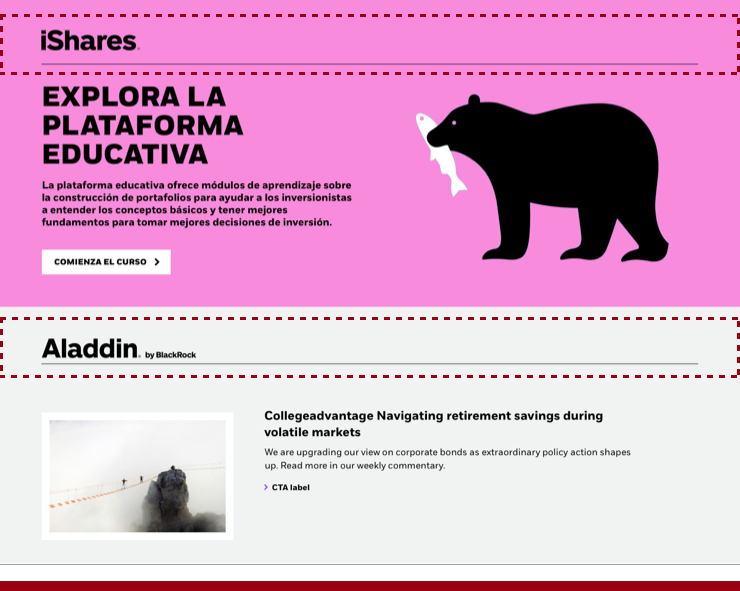
Don’t. Introduce two secondary brands.

Don’t. Use yellow to introduce the brand, as this is a shared brand color and could cause confusion.
Within components
Within a component you should not mix brand assets. Instead, choose one brand or remove images and iconography that could create a confusing visual.


Do. Choose a primary brand when multiple brands are included in a component.
Don'ts

Don’t. Mix imagery within components.